


Como podran haber visto publique algunos ejemplos los cuales usare para crear una plicacion que nos sera de utilidad:
Un desocultador de archivos y carpetas hecho en java si en java usaremos los siguientes ejemplos publicados:

Un desocultador de archivos y carpetas hecho en java si en java usaremos los siguientes ejemplos publicados:
Uso de runtime para ejecutar programa externo
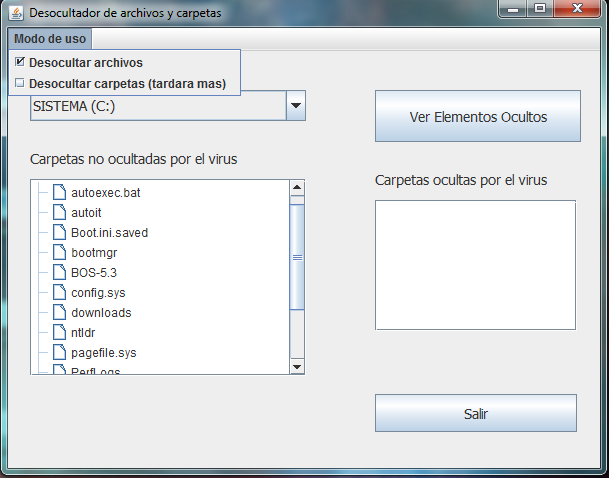
Asi quedaria nuestra aplicacion y el codigo va aqui:
Usaremos estos conceptos para fabricar el programa que asigno el codigo aqui:
/*
* Desocultador.java
*
* Created on 26/11/2010, 06:10:37 PM
*/
package Interfaz;
import java.io.File;
import java.util.Arrays;
import java.util.List;
import javax.swing.DefaultListModel;
import javax.swing.JOptionPane;
import javax.swing.filechooser.FileSystemView;
import javax.swing.tree.DefaultMutableTreeNode;
import javax.swing.tree.DefaultTreeModel;
/**
*
* @author JONATHAN
*/
public class Desocultador extends javax.swing.JFrame {
String Sistema_Operativo = System.getProperty("os.name");
String unidad_elegida = "";
String Letra_unidad_elegida = "";
/** Creates new form Desocultador */
public Desocultador() {
initComponents();
CargarUnidades();
Restaurar.setVisible(false);
setLocationRelativeTo(null); //Centra la pantalla
}
@SuppressWarnings("unchecked")
// //GEN-BEGIN:initComponents
private void initComponents() {
Combox_unidades = new javax.swing.JComboBox();
jLabel1 = new javax.swing.JLabel();
jScrollPane1 = new javax.swing.JScrollPane();
Arbol_unidad = new javax.swing.JTree();
jLabel2 = new javax.swing.JLabel();
VerCarpeta = new javax.swing.JButton();
jScrollPane2 = new javax.swing.JScrollPane();
Lista_carpeta = new javax.swing.JList();
jLabel3 = new javax.swing.JLabel();
Salir = new javax.swing.JButton();
Restaurar = new javax.swing.JButton();
jMenuBar1 = new javax.swing.JMenuBar();
jMenu1 = new javax.swing.JMenu();
Check_Archivos = new javax.swing.JCheckBoxMenuItem();
Check_Carpetas = new javax.swing.JCheckBoxMenuItem();
setDefaultCloseOperation(javax.swing.WindowConstants.EXIT_ON_CLOSE);
setTitle("Desocultador de archivos y carpetas");
Combox_unidades.setFont(new java.awt.Font("Tahoma", 0, 14)); // NOI18N
Combox_unidades.addItemListener(new java.awt.event.ItemListener() {
public void itemStateChanged(java.awt.event.ItemEvent evt) {
Combox_unidadesItemStateChanged(evt);
}
});
jLabel1.setFont(new java.awt.Font("Tahoma", 0, 14)); // NOI18N
jLabel1.setText("Seleccione Unidad a buscar");
javax.swing.tree.DefaultMutableTreeNode treeNode1 = new javax.swing.tree.DefaultMutableTreeNode("JTree");
javax.swing.tree.DefaultMutableTreeNode treeNode2 = new javax.swing.tree.DefaultMutableTreeNode("carpeta");
treeNode1.add(treeNode2);
treeNode2 = new javax.swing.tree.DefaultMutableTreeNode("elemento");
treeNode1.add(treeNode2);
Arbol_unidad.setModel(new javax.swing.tree.DefaultTreeModel(treeNode1));
jScrollPane1.setViewportView(Arbol_unidad);
jLabel2.setFont(new java.awt.Font("Tahoma", 0, 14)); // NOI18N
jLabel2.setText("Carpetas no ocultadas por el virus");
VerCarpeta.setFont(new java.awt.Font("Tahoma", 0, 14)); // NOI18N
VerCarpeta.setText("Ver Elementos Ocultos");
VerCarpeta.addActionListener(new java.awt.event.ActionListener() {
public void actionPerformed(java.awt.event.ActionEvent evt) {
VerCarpetaActionPerformed(evt);
}
});
jScrollPane2.setViewportView(Lista_carpeta);
jLabel3.setFont(new java.awt.Font("Tahoma", 0, 14)); // NOI18N
jLabel3.setText("Carpetas ocultas por el virus");
Salir.setFont(new java.awt.Font("Tahoma", 0, 14)); // NOI18N
Salir.setText("Salir");
Salir.addActionListener(new java.awt.event.ActionListener() {
public void actionPerformed(java.awt.event.ActionEvent evt) {
SalirActionPerformed(evt);
}
});
Restaurar.setFont(new java.awt.Font("Tahoma", 0, 14)); // NOI18N
Restaurar.setText("Restaurar Elementos");
Restaurar.addActionListener(new java.awt.event.ActionListener() {
public void actionPerformed(java.awt.event.ActionEvent evt) {
RestaurarActionPerformed(evt);
}
});
jMenu1.setText("Modo de uso");
Check_Archivos.setSelected(true);
Check_Archivos.setText("Desocultar archivos");
Check_Archivos.setToolTipText("Desoculta archivos lo hace muy rapido");
jMenu1.add(Check_Archivos);
Check_Carpetas.setText("Desocultar carpetas (tardara mas)");
Check_Carpetas.setToolTipText("Usa la modalidad de windows tardara un poco mas");
Check_Carpetas.addActionListener(new java.awt.event.ActionListener() {
public void actionPerformed(java.awt.event.ActionEvent evt) {
Check_CarpetasActionPerformed(evt);
}
});
jMenu1.add(Check_Carpetas);
jMenuBar1.add(jMenu1);
setJMenuBar(jMenuBar1);
javax.swing.GroupLayout layout = new javax.swing.GroupLayout(getContentPane());
getContentPane().setLayout(layout);
layout.setHorizontalGroup(
layout.createParallelGroup(javax.swing.GroupLayout.Alignment.LEADING)
.addGroup(javax.swing.GroupLayout.Alignment.TRAILING, layout.createSequentialGroup()
.addGap(22, 22, 22)
.addGroup(layout.createParallelGroup(javax.swing.GroupLayout.Alignment.LEADING)
.addComponent(jLabel1)
.addComponent(jLabel2, javax.swing.GroupLayout.DEFAULT_SIZE, 276, Short.MAX_VALUE)
.addComponent(Combox_unidades, 0, 276, Short.MAX_VALUE)
.addComponent(jScrollPane1, javax.swing.GroupLayout.DEFAULT_SIZE, 276, Short.MAX_VALUE)
.addComponent(Restaurar, javax.swing.GroupLayout.DEFAULT_SIZE, 276, Short.MAX_VALUE))
.addGap(69, 69, 69)
.addGroup(layout.createParallelGroup(javax.swing.GroupLayout.Alignment.TRAILING)
.addComponent(VerCarpeta, javax.swing.GroupLayout.Alignment.LEADING, javax.swing.GroupLayout.DEFAULT_SIZE, 206, Short.MAX_VALUE)
.addComponent(jLabel3, javax.swing.GroupLayout.Alignment.LEADING)
.addGroup(javax.swing.GroupLayout.Alignment.LEADING, layout.createParallelGroup(javax.swing.GroupLayout.Alignment.TRAILING, false)
.addComponent(Salir, javax.swing.GroupLayout.Alignment.LEADING, javax.swing.GroupLayout.DEFAULT_SIZE, javax.swing.GroupLayout.DEFAULT_SIZE, Short.MAX_VALUE)
.addComponent(jScrollPane2, javax.swing.GroupLayout.Alignment.LEADING, javax.swing.GroupLayout.DEFAULT_SIZE, 202, Short.MAX_VALUE)))
.addGap(19, 19, 19))
);
layout.setVerticalGroup(
layout.createParallelGroup(javax.swing.GroupLayout.Alignment.LEADING)
.addGroup(layout.createSequentialGroup()
.addGap(16, 16, 16)
.addComponent(jLabel1)
.addPreferredGap(javax.swing.LayoutStyle.ComponentPlacement.RELATED)
.addComponent(Combox_unidades, javax.swing.GroupLayout.PREFERRED_SIZE, 31, javax.swing.GroupLayout.PREFERRED_SIZE)
.addGap(29, 29, 29)
.addComponent(jLabel2)
.addPreferredGap(javax.swing.LayoutStyle.ComponentPlacement.UNRELATED)
.addComponent(jScrollPane1, javax.swing.GroupLayout.PREFERRED_SIZE, 197, javax.swing.GroupLayout.PREFERRED_SIZE)
.addGap(18, 18, 18)
.addGroup(layout.createParallelGroup(javax.swing.GroupLayout.Alignment.BASELINE)
.addComponent(Restaurar, javax.swing.GroupLayout.PREFERRED_SIZE, 38, javax.swing.GroupLayout.PREFERRED_SIZE)
.addComponent(Salir, javax.swing.GroupLayout.PREFERRED_SIZE, 38, javax.swing.GroupLayout.PREFERRED_SIZE))
.addContainerGap(14, Short.MAX_VALUE))
.addGroup(layout.createSequentialGroup()
.addGap(39, 39, 39)
.addComponent(VerCarpeta, javax.swing.GroupLayout.PREFERRED_SIZE, 52, javax.swing.GroupLayout.PREFERRED_SIZE)
.addGap(29, 29, 29)
.addComponent(jLabel3)
.addPreferredGap(javax.swing.LayoutStyle.ComponentPlacement.UNRELATED)
.addComponent(jScrollPane2)
.addGap(137, 137, 137))
);
pack();
}// //GEN-END:initComponents
private void Combox_unidadesItemStateChanged(java.awt.event.ItemEvent evt) {//GEN-FIRST:event_Combox_unidadesItemStateChanged
// Significa que fue accionado un elemento
unidad_elegida = Combox_unidades.getSelectedItem().toString();
//System.out.println(unidad_elegida);
Letra_unidad_elegida = Retornar_letra(unidad_elegida);
//System.out.println(Letra_unidad_elegida);
Cambiar_Arbol_directorios();
}//GEN-LAST:event_Combox_unidadesItemStateChanged
private void VerCarpetaActionPerformed(java.awt.event.ActionEvent evt) {//GEN-FIRST:event_VerCarpetaActionPerformed
ListarElementos_ocultos_de_unidad();
int tamaño_de_Jlist = Lista_carpeta.getModel().getSize();
//System.out.println("elemntos" + tamaño_de_Jlist);
//verifica que existen elementos en el jlist
//si los hay activar el boton de recuperacion
if (tamaño_de_Jlist == 0) {
JOptionPane.showMessageDialog(null, "NO EXISTEN ELEMENTOS OCULTOS",
"EN HORA BUENA", JOptionPane.INFORMATION_MESSAGE);
Restaurar.setVisible(false);
} else {
Restaurar.setVisible(true);
JOptionPane.showMessageDialog(null, "TOTAL DE ELEMENTOS OCULTOS :" + tamaño_de_Jlist
+ "\n HAGA CLICK EN EL BOTON RESTAURAR", "ALERTA", JOptionPane.WARNING_MESSAGE);
}
}//GEN-LAST:event_VerCarpetaActionPerformed
private void SalirActionPerformed(java.awt.event.ActionEvent evt) {//GEN-FIRST:event_SalirActionPerformed
System.exit(0);
}//GEN-LAST:event_SalirActionPerformed
private void RestaurarActionPerformed(java.awt.event.ActionEvent evt) {//GEN-FIRST:event_RestaurarActionPerformed
//Desoculta carpetas ejecutando comandos de windows
Process proceso;
String comando = "";
if (Sistema_Operativo.equals("Linux")) {
comando = "";
} else { //Es windows
if (Check_Carpetas.isSelected()) {
comando = "cmd /c attrib -h -s -r " + Letra_unidad_elegida + "\\*.* /s /d";
} else {
comando = "cmd /c attrib -h -s -r " + Letra_unidad_elegida + "\\*.*";
}
}
try {
proceso = Runtime.getRuntime().exec(comando);
JOptionPane.showMessageDialog(null, "Reestablecido satisfactoriamente");
ListarElementos_ocultos_de_unidad();
} catch (Exception ex) {
System.out.println("Ha ocurrido un error al ejecutar el comando. Error: " + ex);
JOptionPane.showMessageDialog(null, "Ocurrio un error");
}
}//GEN-LAST:event_RestaurarActionPerformed
private void Check_CarpetasActionPerformed(java.awt.event.ActionEvent evt) {//GEN-FIRST:event_Check_CarpetasActionPerformed
if (Check_Carpetas.isSelected()) {
JOptionPane.showMessageDialog(null, "MODALIDAD DE DESOCULTAMIENTO DE CARPETAS"
+ "\nESTA MODALIDAD TARDA MAS", "DESOCULTAR CARPETAS", JOptionPane.WARNING_MESSAGE);
}
}//GEN-LAST:event_Check_CarpetasActionPerformed
/**
* @param args the command line arguments
*/
public static void main(String args[]) {
java.awt.EventQueue.invokeLater(new Runnable() {
public void run() {
new Desocultador().setVisible(true);
}
});
}
// Variables declaration - do not modify//GEN-BEGIN:variables
private javax.swing.JTree Arbol_unidad;
private javax.swing.JCheckBoxMenuItem Check_Archivos;
private javax.swing.JCheckBoxMenuItem Check_Carpetas;
private javax.swing.JComboBox Combox_unidades;
private javax.swing.JList Lista_carpeta;
private javax.swing.JButton Restaurar;
private javax.swing.JButton Salir;
private javax.swing.JButton VerCarpeta;
private javax.swing.JLabel jLabel1;
private javax.swing.JLabel jLabel2;
private javax.swing.JLabel jLabel3;
private javax.swing.JMenu jMenu1;
private javax.swing.JMenuBar jMenuBar1;
private javax.swing.JScrollPane jScrollPane1;
private javax.swing.JScrollPane jScrollPane2;
// End of variables declaration//GEN-END:variables
private void CargarUnidades() {
List files = Arrays.asList(File.listRoots());
for (File f : files) {
String elemento = FileSystemView.getFileSystemView().getSystemDisplayName(f);
if (!elemento.isEmpty()) //No admite elementos vacios
{
Combox_unidades.addItem(elemento);
}
}
}
private void Cambiar_Arbol_directorios() {
//Enlistar directorios de unidad
String letra = Letra_unidad_elegida + "\\";
DefaultMutableTreeNode padre = new DefaultMutableTreeNode(letra);
File Dir = new File(letra);
File[] lista_Archivos = Dir.listFiles();
for (int i = 0; i < lista_Archivos.length; i++) {
if (!lista_Archivos[i].isHidden()) {
//System.out.println(" Elementos no ocultos "+lista_Archivos[i].getName());
DefaultMutableTreeNode hijo = new DefaultMutableTreeNode(lista_Archivos[i].getName());
padre.add(hijo);
}
}
Arbol_unidad.setModel(new DefaultTreeModel(padre));
}
private void ListarElementos_ocultos_de_unidad() {
String letra = Letra_unidad_elegida + "\\";
DefaultListModel modelo = new DefaultListModel();
File Dir = new File(letra);
File[] lista_Archivos = Dir.listFiles();
for (int i = 0; i < lista_Archivos.length; i++) {
if (lista_Archivos[i].isHidden()) {
//System.out.println(" Elementos ocultos " + lista_Archivos[i].getName());
modelo.addElement(lista_Archivos[i].getName());
}
}
Lista_carpeta.setModel(modelo);
}
private String Retornar_letra(String unidad_elegida) {
int tamaño = unidad_elegida.length();
return unidad_elegida.substring(tamaño - 3, tamaño - 1);
}
}
